
abeMeda
The File Is Out There
 Deutsch
abeMeda is used by:
NASA
Bang & Olufsen
BMW
Volkswagen AG
Digital Concert Hall der Berliner Philharmoniker
Madison Square Garden New York
Westinghouse
Philips Design
ABB Schweiz AG
Heidelberger Druckmaschinen KG Kiel
Bayer AG
OSRAM
and many more...

How abeMeda is used in an Advertising Agency
Set up abeMeda to share the catalog database in the network
abeMeda stores its catalog database files inside any specified database folder, so you can simply use a network server to host that folder to share your catalogs among multiple users.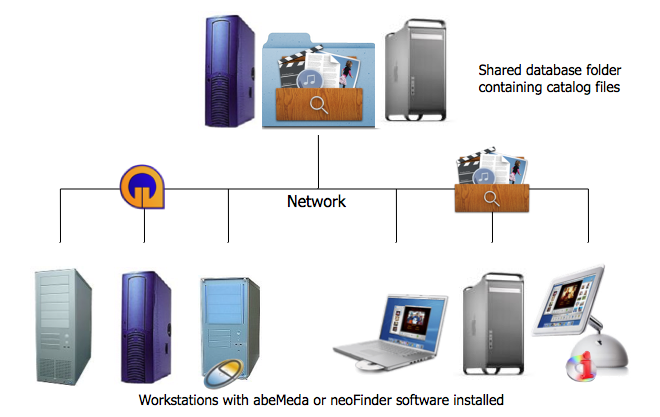
As the separate tool neoFinder for Macintosh uses the
very same data format as abeMeda, you can even share your data
across platforms this way (on both Apple Macintosh and Microsoft
Windows)!
Set up abeMeda for network use in three easy steps:
1. Create a new folder on a server volume. Name it "abeMeda
Catalogs" or something similar. Make sure that this folder can be
accessed by all computers which will run abeMeda or
neoFinder.
2. Install and configure abeMeda or neoFinder on every machine.
Please make sure you have enough licenses for both, as the
networking feature will only work if you have a suffient number of
licenses.
3. Tell every abeMeda copy to use the "abeMeda Catalogs" folder on
the server as the database folder. Use the abeMeda Preferences for
that:
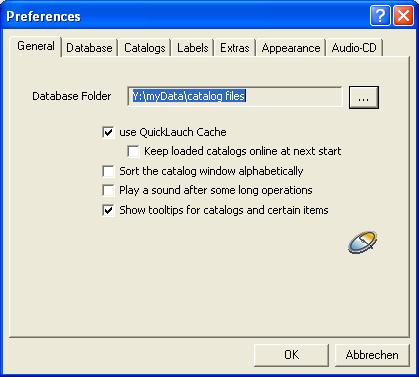
Click on the "..." button, and select the folder you have created
in step one.
Now repeat this very same procedure on every PC you want to use
(and you have abeMeda licenses for!).
That's it! Now that was simple.
There are a few extra things to be considered:
This really requires a Business License for abeMeda! You must have once license for every PC in the network you want to run abeMeda on. It makes no difference if you actually store the abeMeda application on your file server...
Make sure that both platforms can access the catalog data folder. Most current servers will allow that.
It doesn't matter which computer platform the server uses, as long as both Mac and Windows can access the catalog data folder.
If you do not wish that every user in the network may change the catalogs in the data folder, just use the access privileges that your server provides! Allow only one or a few administrators write access to the catalog data folder and its subfolders, while everyone else just has read access. abeMeda will honor these access rights and handle accordingly.
As abeMeda for Windows and NeoFinder for Mac are developed and sold by two different companies, it is necessary to obtain licenses for the two applications separately.
Please contact:
* sales@abeMeda.de about licensing abeMeda for Windows (or look here)
* sales@neofinder.de about licensing NeoFinder for Macintosh (or look here)